Multiple Etsy shops
Learn how to run multiple Etsy shops safely, avoid account linking, and build a scalable workflow for growth. A practical guide for sellers managing more than one store.


Managing multiple Etsy shops can be a smart move when your products, audiences, or business models are genuinely different — but it only works if you understand Etsy’s rules, your operational workload, and the technical realities of account separation. Whether you want to run multiple Etsy shops for digital downloads, handmade goods, or print-on-demand products, the goal is not just to stay organized; it’s to keep every Etsy seller account compliant, scalable, and easy to audit.
In this guide, we’ll break down what Etsy’s current Etsy shop policy actually allows, when it makes sense to open a second Etsy shop, and when Etsy multiple accounts can create more problems than they solve. We’ll also cover the practical side of Etsy account management: branding, inventory, bookkeeping, tax considerations, and how to avoid common mistakes like Etsy duplicate shops, trademark conflicts, and duplicate listings that can hurt both SEO and trust.
If you need a workflow that keeps multiple Etsy stores separated without turning account management into a headache, tools like GoUndetected.io can help you isolate browser profiles and reduce cross-account contamination. That matters because modern marketplace operations often involve more than just logging in — they involve managing a browser digital fingerprint, IP address, and team workflow in a way that supports legitimate business separation. If you want to manage multiple Etsy shops the right way, start with the policy, then build the system around it.
Multiple Etsy Shops
Many Etsy sellers eventually outgrow a single-shop setup. Splitting products across multiple shops can make operations cleaner, improve niche focus, and reduce the risk of one store becoming too broad to market effectively. For teams managing several storefronts, the key is doing it in a way that stays organized, compliant, and easy to scale.
Why Sellers Split
Sellers usually open separate Etsy shops when their product lines serve different buyers, price points, or brand stories. A handmade jewelry brand and a digital planner shop, for example, may attract entirely different audiences and require different visuals, keywords, and fulfillment workflows.
Multiple shops can also help isolate risk and simplify testing. If one niche underperforms, the others are not affected. It also makes it easier to measure conversion, ad performance, and repeat purchase behavior by category instead of mixing all data in one storefront.
Platform Rules
Etsy allows sellers to operate more than one shop, but each shop must be independently managed and fully transparent. You should review the latest guidance in Etsy’s Multiple Shops policy and related seller help pages before expanding.
| Rule Area | What to Keep in Mind |
|---|---|
| Disclosure | Be clear about shop ownership when required. |
| Operations | Each shop needs its own listings, branding, and management. |
| Compliance | Avoid any setup that looks like policy evasion or duplicate activity. |
Brand Strategy
From a branding perspective, multiple shops work best when each one has a distinct purpose. That means separate names, visuals, product positioning, and messaging that match the niche. A clear brand architecture helps customers understand what each shop offers and makes cross-shop growth easier to manage.
- Use one shop per niche or customer segment.
- Keep product photography and tone consistent within each storefront.
- Track performance separately so you can see which brand is scaling.
If you are managing several Etsy identities at once, operational separation matters as much as branding. Tools like GoUndetected.io can help keep workflows organized while supporting safer multi-account management across different projects.
Etsy Policy Basics
Etsy’s policy framework is designed to keep marketplaces authentic, transactions traceable, and seller behavior consistent. For multi-account operators, the key challenge is that Etsy looks beyond login credentials and checks for patterns that suggest one person may be controlling multiple shops or masking identity.
Account Limits
Etsy does not publicly advertise a simple “one account per person” rule, but it does expect each shop to have a legitimate purpose, accurate ownership details, and consistent operational behavior. If multiple accounts are used, they should be clearly justified and separated by business need, not created to bypass enforcement or restrictions.
In practice, account limits become a problem when shops share the same recovery data, payment setup, device fingerprint, or browsing environment. Etsy’s systems can connect those dots quickly, especially when new shops scale too fast or behave like clones of existing ones.
Shared Info
Shared information is one of the biggest policy triggers. Etsy can correlate accounts through overlapping emails, phone numbers, billing details, IP history, shipping patterns, and even repeated product metadata. If two shops look operationally linked, they may be treated as one risk profile.
- Shared login or recovery email
- Same payment card or bank account
- Repeated device/browser fingerprints
- Matching address, tax, or shipping data
- Duplicate listings, photos, or descriptions
Risk Signals
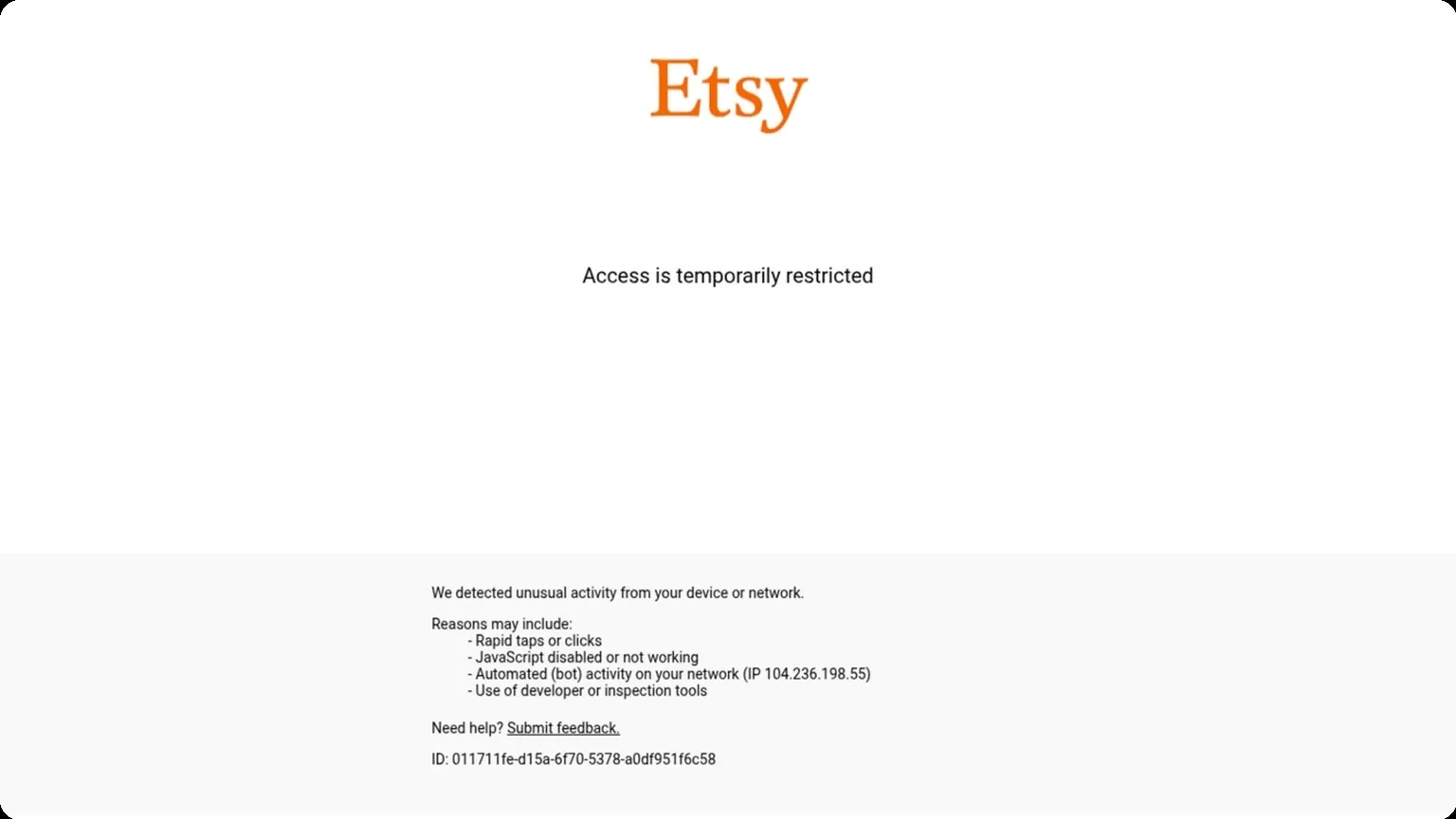
Etsy’s trust systems look for clusters of signals rather than a single red flag. Sudden account creation, frequent IP changes, inconsistent location data, repeated policy warnings, and unusual order behavior can all increase scrutiny. The more signals stack up, the more likely an account review, limitation, or suspension becomes.
For sellers managing several storefronts, reducing overlap is essential. A cleaner operational setup lowers the chance that one shop’s issue spills into another. You can review Etsy’s own guidance in the Seller Policy and Help Center to understand what the platform expects from each account.
Setting Up Safely
Setting up multiple accounts safely starts with separation. The goal is to make each profile look and behave like a distinct real user, so your setup should avoid shared identifiers, reused assets, and predictable patterns. A disciplined launch process reduces flags before you even log in.
Separate Emails
Use a unique inbox for every account, and keep recovery details isolated as well. Shared email domains, forwarding rules, or repeated signup patterns can create unnecessary linkage across profiles. For higher-volume workflows, a dedicated email per account is the cleanest baseline.
Before creating accounts, prepare the essentials in one place:
- Unique email address
- Dedicated recovery email or phone where required
- Separate password manager entries
- Consistent naming convention for internal tracking
Unique Branding
Branding should not be copy-pasted across accounts. Reusing the same logo, bio, profile image, or product descriptions makes accounts easier to correlate, especially on platforms that compare behavioral and content signals. Build each profile around a distinct audience, tone, and visual identity.
A simple rule is to vary the elements that users actually see. That includes display names, profile photos, color palettes, and posting style. If you need a reference point, compare your account setup against the platform’s own identity and policy guidance, such as Instagram Help Center or Google Account Help.
Payment Setup
Payment details are one of the strongest cross-account signals, so treat them with extra care. Whenever possible, use separate cards, billing names, or payment methods per account. Avoid reusing the same billing profile unless the platform explicitly supports it for your use case.
| Setup Element | Safer Approach | Risk to Avoid |
|---|---|---|
| One inbox per account | Shared recovery paths | |
| Branding | Distinct visuals and bios | Duplicate assets |
| Payment | Separate billing details | Reused cards or profiles |
Operations Workflow
Efficient operations depend on keeping inventory, routing, and support tightly connected. For multi-account teams, the goal is not just speed, but consistency: every order should be assigned correctly, every stock move should be traceable, and every customer touchpoint should feel coordinated across accounts and channels.
Inventory Split
Inventory split starts with segmenting stock by marketplace, store, region, or brand. This reduces overselling risk and makes it easier to assign the right units to the right account. In practice, teams often define rules for reserved stock, safety buffers, and replenishment thresholds so each account operates within clear limits.
A simple setup usually works best when paired with a shared control view. That way, managers can see what is available, what is committed, and where stock is moving next.
- Reserve stock by channel or seller account
- Set minimum thresholds to prevent stockouts
- Track transfers between warehouses or fulfillment nodes
Order Routing
Order routing determines which account, warehouse, or process handles each incoming order. The strongest workflows use rule-based logic such as geography, product type, shipping speed, or account capacity. This helps reduce manual decisions and keeps fulfillment consistent during traffic spikes.
For teams managing multiple storefronts, routing should be measurable. Compare performance by route type to identify delays, error rates, and cost differences.
| Routing Option | Best For | Primary Benefit |
|---|---|---|
| Geo-based | Regional fulfillment | Faster delivery times |
| Capacity-based | High-volume periods | Balanced workload |
| Rule-based | Complex catalogs | Fewer manual errors |
Customer Support
Support workflows should mirror the same operational structure behind the scenes. When agents can see order status, stock availability, and account context in one place, response times improve and resolution becomes more accurate. According to Zendesk research, customers increasingly expect fast, personalized answers across channels.
To keep support efficient, standardize response paths and escalation rules. This is especially useful when one issue affects multiple accounts or inventory streams.
- Tag the request by account, order, or product line
- Check routing history and fulfillment status
- Escalate only when the issue affects stock, payment, or delivery

Avoiding Detection
Staying below a platform’s radar is less about “hiding” and more about consistency. The strongest signals come from mismatched IPs, shared device fingerprints, and erratic login behavior, so the goal is to make each account look like it belongs to one stable, predictable operator.
IP Hygiene
Use clean, dedicated IPs that match the account’s usual geography and never rotate them aggressively. A sudden jump from one country, ISP, or datacenter range to another can trigger trust checks even if the login is otherwise normal.
For multi-account work, keep a simple rule: one account cluster, one proxy identity, one location pattern. If you need a proxy strategy overview, compare residential, mobile, and datacenter options in your GoUndetected.io workflow before scaling.
Device Separation
Platforms correlate browser fingerprints, OS details, screen settings, fonts, and local storage. If two accounts share the same device signature, they can be linked even when the IP is different. That is why device separation matters as much as proxy hygiene.
- Use a distinct browser profile for each account.
- Keep time zone, language, and geolocation aligned with the proxy.
- Avoid copying extensions, cookies, or saved sessions across profiles.
Login Habits
Human-like login behavior reduces risk. Log in from the same profile, at similar times, and avoid rapid account switching in the same session. Sudden bursts of activity, repeated password resets, or back-to-back logins from new environments often look suspicious.
Build a routine that is easy to repeat:
- Open the correct isolated profile.
- Check the proxy and fingerprint match the account.
- Log in once, then complete the planned task.
Scaling Growth
Once your first campaigns are profitable, the next challenge is making growth repeatable. Scaling too fast can distort your data, strain your ops, and trigger platform reviews, so the goal is controlled expansion: validate, measure, then increase volume with confidence.
Test Products
Before committing budget, test new products, creatives, and audiences in small, isolated batches. Keep variables tight so you can see what actually moves performance. A strong test plan usually starts with one product angle, one traffic source, and one clear conversion goal.
Use account separation and clean browser profiles to compare results without cross-contamination. If you’re managing multiple storefronts or ad identities, tools like GoUndetected.io help keep testing environments organized while reducing the risk of fingerprint overlap.
- Launch low-budget pilots before scaling spend.
- Test one major variable at a time.
- Document winning combinations for reuse.
Track Metrics
Scaling should be driven by numbers, not intuition. Monitor profitability and operational health together, because a campaign with strong CTR can still fail if refunds, chargebacks, or account issues rise too quickly.
Focus on a small dashboard of metrics that tell the full story. Review them daily during testing and weekly once a campaign stabilizes.
| Metric | Why it matters | Signal to watch |
|---|---|---|
| CPA / CAC | Measures acquisition efficiency | Rising cost with flat revenue |
| Conversion rate | Shows offer-market fit | Drop after creative or audience changes |
| ROAS / margin | Confirms real profitability | Revenue up, profit down |
Expand Smart
When a product proves consistent, scale in layers rather than all at once. Increase spend, add new creatives, and open adjacent audiences only after the current setup holds steady for several cycles. This keeps performance predictable and makes failures easier to diagnose.
Smart expansion also means protecting account health. Spread risk across profiles, proxies, and workflows, and keep each environment as clean as possible. That way, growth comes from better execution, not from pushing one account until it breaks.
Need more hands-on playbooks? Read How to Choose the Right Anti-Detection Browser for E-commerce Marketplaces: Amazon, eBay, and Shopify Use Cases, Manage multiple Google accounts, and How to Choose an Anti-Detection Browser for Client Account Handoffs: A Practical Evaluation Framework.