Best virtual and cloud browsers in 2026, by use case
Compare 11 virtual and cloud browsers for free sessions, testing, isolation, AI agents and saved profiles. Official prices checked on 2 November 2026.

Disclosure: GoUndetected is our product. We list it only for the use case it fits, and we show where other tools are better.
What is the best virtual browser in 2026? It depends on the job. For free quick sessions, use MyBrowser or Browser.lol. For testing, BrowserStack or TestMu AI. For AI agents, Browserbase or Browser Use Cloud. For many accounts with saved logins, GoUndetected is an antidetect browser for Windows and macOS with per-profile fingerprints and its own ISP proxies.
Prices and limits below were checked against official vendor pages on 2 November 2026. This is a documentation comparison, not a hands-on performance ranking. Plan names, billing periods and included usage matter; a cheap hourly rate is not necessarily a cheap total workflow. Sources are linked beside the relevant claims and collected at the end.
Quick picks
| Use case | Best pick | Why | Starting price | Free option |
|---|---|---|---|---|
| Free quick session | MyBrowser or Browser.lol | Opens a real browser in your tab with nothing to install | MyBrowser Starter $8/month; Browser.lol Plus $9/month | MyBrowser: 3 minutes with no sign-up. Browser.lol: ad-supported free tier |
| Cross-browser testing | BrowserStack or TestMu AI | Desktop browser/OS coverage and separate real-device plans | BrowserStack Live Freelancer $12.50/month billed annually; TestMu AI Virtual Live $15/month per parallel, billed annually | BrowserStack Free: 100 testing minutes; TestMu AI: limited 2-minute sessions |
| Suspicious link checks | Browserling Cybersecurity | Disposable virtual machines; file analysis requires a higher plan | Analyst $49 per user per month, billed annually | 10 sessions a month of 3 minutes each |
| Cloud desktop / OSINT | Kasm Workspaces | A hosted browser or full desktop that is deleted after use | Cloud Browser $10/month | Not listed |
| AI agents and automation | Browserbase, Browser Use Cloud or Browserless | Remote browsers controlled through code, with different usage meters | Browserbase $20/month; Browser Use $0.02/browser hour plus traffic; Browserless $25/month billed annually | Browserbase: 1 hour; Browser Use: eligible $1 credit; Browserless: 1,000 units/month |
| Many accounts with saved logins | GoUndetected | Saved profiles, each with its own fingerprint, cookies and proxy | Starter $6/month for 5 profiles | Free 7-day trial |
| Cloud browser with built-in residential IPs for automation | GoLogin Cloud Browser | Hosted profiles with residential IPs included in the plan | Professional $4.50/month | 3 runs of up to 15 minutes |
What is a virtual browser?
A virtual browser is a real web browser running on a remote server, container or virtual machine. You control it through a streamed view or an API instead of running that browser directly on your own computer. Browser data may stay on the remote service, but downloads, clipboard transfer and saved profiles depend on the implementation.
Some services delete the working browser after each session; others retain selected cookies and settings for later use. Check that distinction before signing in. A virtual browser can help with a quick compatibility check, a separate browsing environment or access from a device where you cannot install software. People also search for it as a virtual browser online, a cloud based browser or simply cloud browsing.
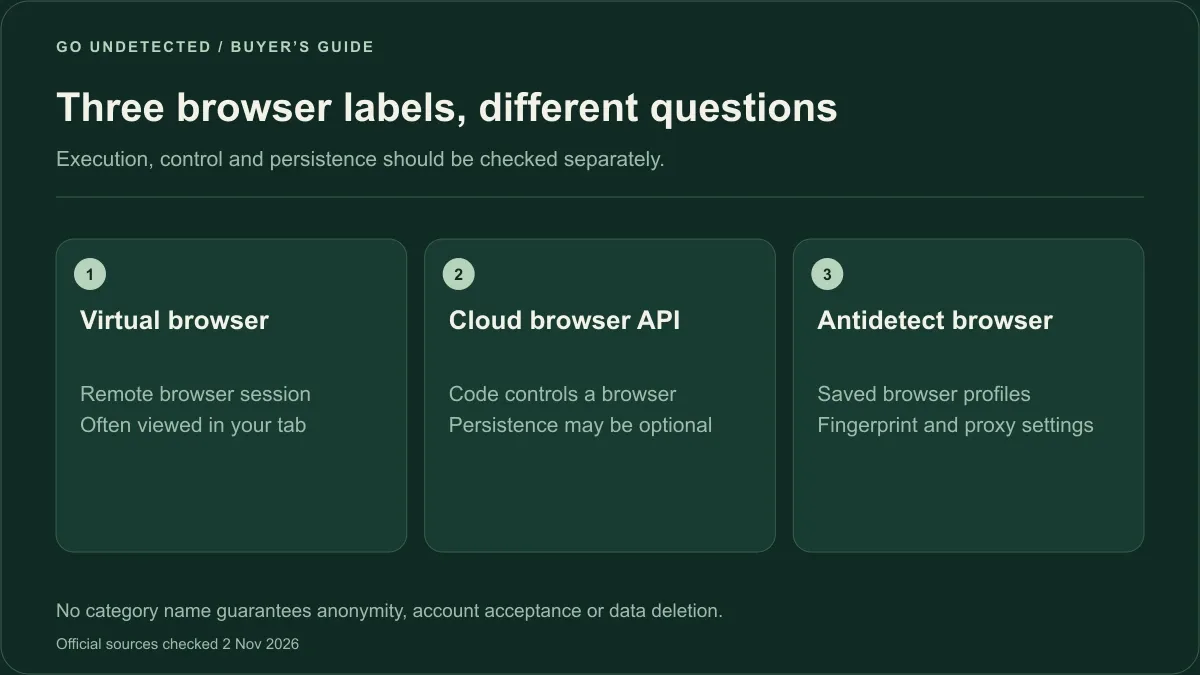
These categories overlap. Confirm where the browser runs and what data it retains.
Virtual browser vs cloud browser
In practice the two terms mean almost the same thing: a browser that runs on someone else's server. "Cloud browser" is also used for hosted browsers that scripts and AI agents control through an API, with no person watching the screen. Browserbase, Browser Use Cloud and GoLogin Cloud Browser are in that second group.
Virtual browser vs browser emulator
Device emulation can imitate properties such as viewport size, touch input and user agent. A virtual browser runs an actual browser engine remotely. That is useful for compatibility work, but rendering still depends on the browser version, operating system and hardware; a desktop mobile-emulation mode is not the same as a real phone.
Virtual browser vs antidetect browser
A virtual browser separates the remote browsing environment from your local one. An antidetect browser adds configurable browser fingerprints and separate profile storage, usually with a proxy assigned to each profile. Those profiles are intended for reuse, rather than disposal after one visit. They do not guarantee that websites cannot connect accounts or ask for verification.
That distinction is why GoUndetected appears here for managing many accounts with saved logins. If you are choosing an isolation method, read antidetect browser vs virtual machine.
How we chose
We did not rank these tools from first to last, because they solve different problems. Instead we grouped them by use case and compared what each one publishes about itself. Prices, free limits and session limits come from each vendor's pricing page and were checked on 2 November 2026. Where a vendor does not publish a number, the table says "Not listed" rather than guessing.
We compared each tool on six points:
- What is saved between sessions: nothing, saved profiles, or saved logins and cookies.
- Session limit: how long one session can run, and how many sessions you get for free.
- IP and proxy options: fixed server locations, built-in residential IPs, or your own proxy.
- Team features: shared access, seats and per-user pricing.
- API: whether scripts and agents can start and control sessions.
- Price: the lowest public paid plan and the free option.
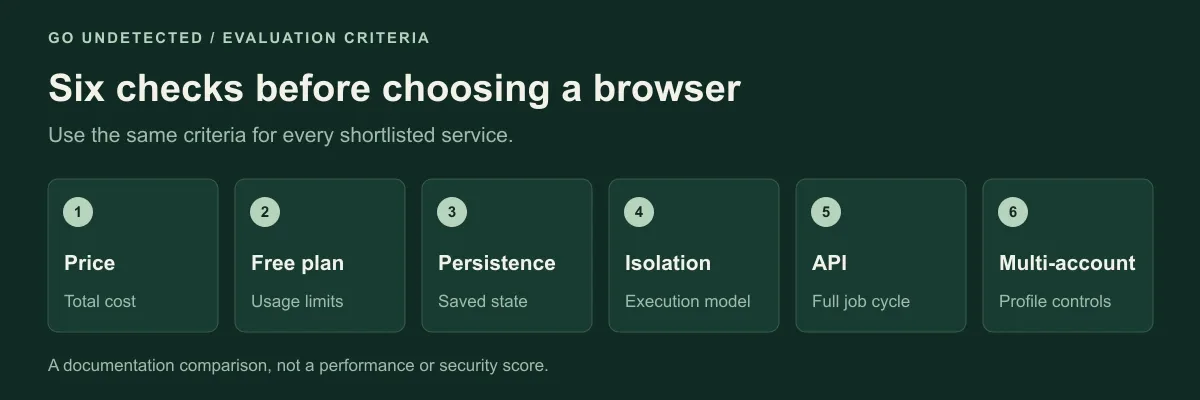
Use the same six criteria for every service. These are evaluation categories, not benchmark scores.
Best free virtual browsers
If you need a free virtual browser online for a few minutes, the services below provide short remote sessions or an ad-supported tier. They differ in browser availability and session limits. Treat a temporary session as temporary: do not assume a login will be waiting when you return.
MyBrowser
MyBrowser (mybrowser.lol) starts a real Chrome, Firefox, Edge, Brave or Tor browser on its servers and streams it to your tab. A session lasts 3 minutes without signing up, or 5 minutes with a free account. When the session ends, the browser is deleted with its history, cookies, logins and downloads. Paid plans add longer sessions: Starter is $8/month with up to 4 hours per session, Developer is $16/month and Developer Pro is $25/month, all billed monthly, with up to 46% off for yearly payment. Payment is in cryptocurrency. MyBrowser publishes these limits on its website.
Choose MyBrowser if you want a free cloud browser with no account and no install, for a few minutes.
Browser.lol
Browser.lol is an isolated cloud browser with a free, ad-supported tier. Paid plans start at $9/month (Plus), which removes ads and adds exit-country selection, custom proxy support and three saved profiles in beta. Premium is $19/month with six saved profiles and two simultaneous sessions; these saved profiles are also in beta. Temporary sessions discard browser data when they end, but closing the viewer tab does not end a session immediately. Pricing and session documentation explain the distinction. For a full breakdown, read our Browser.lol review or the side-by-side Browser.lol alternative page.
Choose Browser.lol if you want a free tier you can return to, and may later pay for a few saved profiles.
Browserling free plan
Browserling runs real desktop browsers in virtual machines. Its Web Testing product has a limited free plan with live sessions on Windows 10, and the public virtual browser demo runs one browser for 3 minutes. Sessions are disposable. Paid Web Testing plans start at $9/month billed annually ($12 month to month). If Browserling itself does not fit, see our Browserling alternatives.
Choose Browserling free if you want a quick look at a page in a desktop browser on Windows 10.
For one-off tasks, a free option may be enough. If you need to return to the same logged-in accounts every day, check for saved profiles or persistent contexts instead of assuming a free disposable session will retain them. Developer-focused Browserless also has a free tier; its API and usage units are covered in the automation section below.
Best for cross-browser testing
Testing grids give you many browser versions, operating systems and real mobile devices, plus automation for test suites. They are built for developers and QA teams, not for keeping accounts.
BrowserStack
BrowserStack offers desktop-browser and real-mobile testing products. Live Freelancer is $12.50/month billed annually or $19 month to month. Its current Free offer includes 100 testing minutes. Check which Live product covers your required devices before choosing a plan: desktop-browser access and a real-device plan are not interchangeable. Official BrowserStack pricing.
Choose BrowserStack if you need real iOS and Android devices next to desktop browsers.
TestMu AI (formerly LambdaTest)
TestMu AI, formerly LambdaTest, separates virtual-browser testing from real-device access. Its free tier includes limited 2-minute live sessions renewed monthly. Virtual Live is $15/month per parallel session, billed annually; Real Device Plus Live is $39/month per parallel, also billed annually. Match the plan to your browser, simulator or physical-device requirement. Official TestMu AI pricing.
Choose TestMu AI if you want a free plan for quick checks and a low entry price for live testing.
Browserling (Web Testing)
Browserling Web Testing streams real desktop browsers, including older versions, to your tab. Starter is $9/month billed annually ($12 monthly), Developer is $19 ($24 monthly) and Developer Pro is $29 ($39 monthly). Developer adds geo-browsing from 20 countries, and Developer Pro adds 50+ countries plus macOS, iOS and native Safari. Team plans start at $19 per user per month, billed annually. Official Web Testing pricing.
Choose Browserling if you mostly need quick live checks on desktop browsers and want the lowest paid entry point.
Best for security and isolation
A disposable remote browser adds separation when investigating an unfamiliar link. For suspicious files, choose a product and plan explicitly designed for file analysis; a generic streamed browser is not automatically a malware-analysis environment.
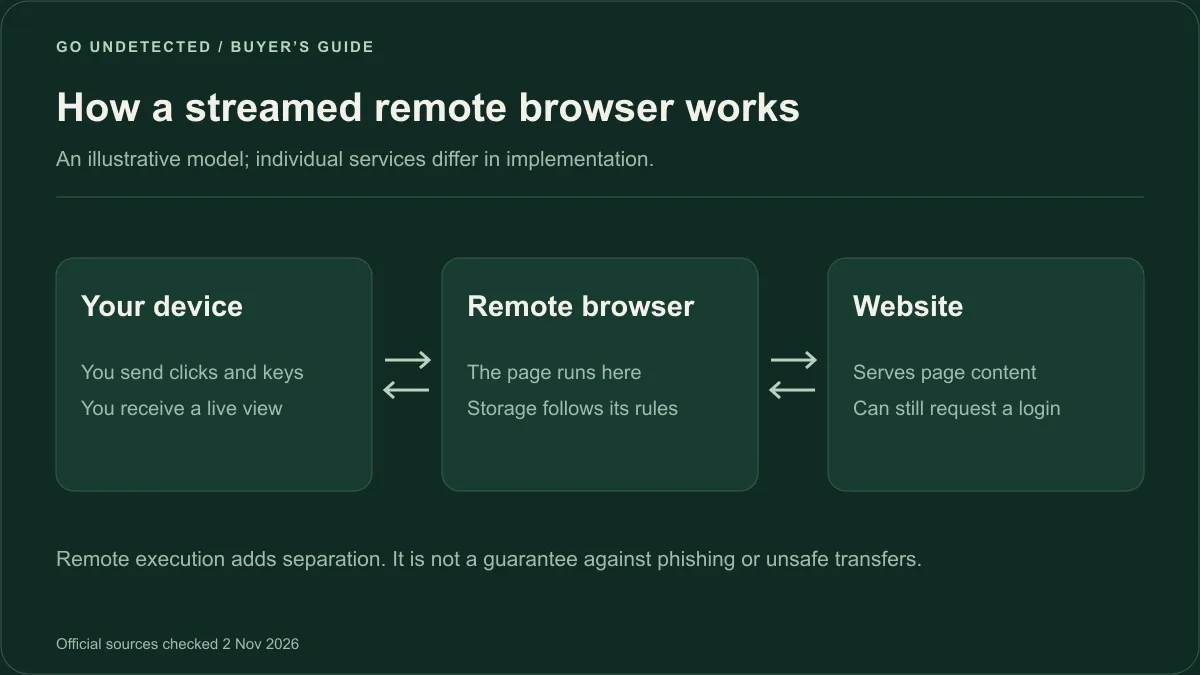
The remote browser executes the page; the viewer sends input and receives a rendered view. Data handling varies by provider.
What remote browser isolation means
Remote browser isolation (RBI) executes the page in a separate environment and sends a representation of the page to the viewer. Pixel-streaming implementations send a live image and relay input. This reduces direct page-code exposure, but it does not prevent credential phishing, unsafe file transfers or every possible attack. Data retention and isolation architecture still matter. If your main concern is everyday privacy rather than isolation, see our guide to secure browsers and our explainer on the anonymous browser.
Browserling Cybersecurity
Browserling Cybersecurity uses disposable virtual machines. The free sandbox gives 10 sessions/month of 3 minutes each on Windows 10 with Chrome and Edge, without file uploads. Analyst is $49/user/month billed annually for link investigation; Researcher is $99/user/month billed annually and adds file handling and network controls. SOC plans are custom-priced. Official Cybersecurity pricing.
Choose Browserling Cybersecurity if you check phishing links or unknown files as part of your work.
Kasm Workspaces
Kasm Cloud Personal provides on-demand workspaces that are deleted after each use. Cloud Browser is $10/month with 100 hours per month, a choice of Brave, Chrome, Chromium, Edge, Firefox or Vivaldi, and a 20-minute timeout, with no built-in file persistence. Cloud Desktop is $20/month and Cloud OSINT, a workspace for open-source investigations, is $40/month. Its six endpoints are US-Virginia, US-California, Germany, India, Brazil and Australia. Official Kasm Cloud Personal plans.
Choose Kasm if you want a hosted browser or full desktop for research, and you are fine with nothing being saved.
Best cloud browsers for automation and AI agents
A cloud browser for automation is a hosted browser that your code starts, controls and closes through an API, usually with Playwright or Puppeteer. These services are built for programmatic tasks such as testing, data extraction and agents that browse with permission. Some also preserve browser state across runs. For those jobs, compare APIs, concurrency, state retention and total usage cost separately.
Browserbase
Browserbase runs browser infrastructure for AI agents. The Free plan includes 1 browser hour, 3 concurrent browsers and sessions of up to 15 minutes. Developer is $20/month with 100 browser hours and 25 concurrent browsers, then $0.12 per extra hour. Startup is $99/month with 500 hours and 100 concurrent browsers, and Scale is custom. Network usage and other platform services have their own allowances and charges. Official Browserbase pricing. Its optional Contexts preserve cookies and application data across sessions; persistence must be enabled for changes to be retained.
Choose Browserbase if you are building an agent product and want browsers, search and fetch APIs from one vendor.
Browser Use Cloud
Browser Use Cloud uses pay-as-you-go credits: browsers cost $0.02 per browser hour, plus $5/GB for residential proxy traffic. Browser time is rounded to whole minutes with a one-minute minimum; direct or own-proxy traffic has a separate $0.20/GB charge. Eligible new signups receive a one-time $1 credit. Model/agent use is priced separately from browser hosting. Official Browser Use pricing.
Choose Browser Use Cloud if you want usage-based browser hosting and can estimate both runtime and traffic costs. A low runtime rate alone does not establish the lowest total price.
Browserless
Browserless is browser infrastructure for scripts rather than a simple “paste a URL and browse” service. Its free plan includes 1,000 units/month, two concurrent browsers and a two-minute session limit. The Prototyping plan is $25/month billed annually, with 20,000 units and a 15-minute session limit. Paid plans extend concurrency and storage allowances.
A unit covers up to 30 seconds of browser connection time. Reconnecting, proxy traffic and some additional operations consume units too, so estimate the complete job instead of converting units straight into browsing hours. The platform supports Playwright/Puppeteer connections and has configurable persistence. Official Browserless pricing.
Choose Browserless if you need programmable remote browsers and prefer a unit-based allowance you can map to a known workload.
GoLogin Cloud Browser
GoLogin Cloud Browser is a separate product from GoLogin's desktop app: hosted browser profiles controlled through an API, with residential IPs included. The free tier gives 3 runs of up to 15 minutes each. Professional is $4.50/month for 50 browser hours, Business is $8/month for 100 hours and 2 parallel sessions, and Enterprise is $14/month for 200 hours and 3 parallel sessions. Extra proxy traffic is $1/GB; added parallel sessions cost $2/month each. Official GoLogin Cloud Browser plans.
Choose GoLogin Cloud Browser if your automation needs residential IPs and saved profiles in the cloud without managing proxies yourself.
Best for managing many accounts: GoUndetected
For repeated work in the same accounts, persistence matters more than a disposable session. A saved-profile browser can keep each client workspace organized with separate cookies and proxy assignments. The choice depends on whether your work is mostly interactive or automated, and whether you want local or hosted execution.
What it is
GoUndetected is an antidetect browser for Windows and macOS that keeps every browser profile separate, with its own fingerprint, cookies and proxy. It runs a Chromium-based browser on your computer. Plans start at $6/month for 5 profiles (Starter); Basic is $39/month for 50 profiles, Team starts at $69/month for 200 profiles and Unlimited starts at $699/month. See all GoUndetected plans.
Saved profiles with their own fingerprint
Each profile has independent fingerprint settings, covering signals such as user agent, screen, time zone, language, Canvas and WebGL, plus separate browser storage. Saved state can be reused across launches. A website can still expire a cookie, revoke a session or request verification, so preserving browser data does not guarantee a continuing login.
Its own dedicated ISP proxies
You can connect your own HTTP or SOCKS5 proxies, or buy dedicated ISP proxies from GoUndetected: static IPs in the US and Ukraine at $2.20 to $3.00 per IP per month, billed separately from the browser plan. Before you assign an IP to a profile, you can check your proxy.
Cloud sessions on Team and Unlimited
The Team plan includes 200 cloud browser hours per month and Unlimited includes 1,000. Developers can manage profiles through the REST API and launch a profile as a cloud browser with the SDK for Puppeteer and Playwright.
Where it is not the right fit
- There is no "open in a tab, nothing to install" mode on Starter and Basic. It is a desktop app.
- It is not a testing grid: no old Internet Explorer, native Safari or iOS devices.
- It is not a sandbox for suspicious files or malware.
- There is no permanent free plan, only a 7-day free trial.
An antidetect browser is not permission to break a platform's rules. Use it to keep legitimate accounts separate, such as client, brand or team accounts.
Start 7-day free trial or compare plans.
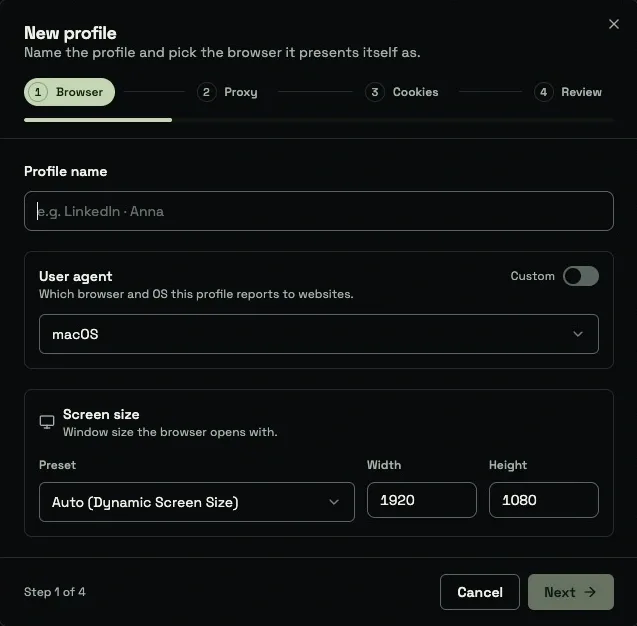
Comparison table
| Tool | Type | Runs where | Saved sessions | Session limit | Proxy/IP options | Team | API | Starting price | Free option |
|---|---|---|---|---|---|---|---|---|---|
| GoUndetected | Antidetect | Windows/macOS app; cloud on eligible plans | Separate saved profiles | Local capacity depends on your computer; cloud allowance by plan | Your own proxy or optional dedicated ISP IPs | Shared folders on team plans | REST API and SDK | $6/month (Starter) | 7-day trial |
| MyBrowser | Virtual | Cloud, in your tab | No, deleted after each session | 3 min free (5 with account); up to 4 h on Starter | No geo IPs | Not listed | Not listed | $8/month (Starter) | 3-minute sessions, no sign-up |
| Browser.lol | Virtual | Cloud, in your tab | 3 on Plus / 6 on Premium, beta | Runtime depends on plan; 1/2 concurrent paid sessions | Exit locations and custom proxy on paid plans | Check current workspace eligibility | MCP beta on Premium | $9/month (Plus) | Ad-supported tier |
| Browserling | Virtual | Cloud virtual machines | No, disposable | 3-minute demo; limited free sessions | Geo-browsing from 20 countries (Developer) or 50+ (Developer Pro) | Team plans from $19 per user | Yes, Live API | $9/month billed annually | Limited free plan; Cybersecurity sandbox 10 x 3 min a month |
| Browserless | Cloud API | Hosted browsers controlled by code | Persistence/reconnect options by plan | Free: 2 min, 2 concurrent; Prototyping: 15 min | Proxy usage consumes extra units; bring-your-own on paid plan | Enterprise roles available | Yes | $25/month billed annually | 1,000 units/month |
| Kasm Workspaces | Cloud desktop | Cloud, in your tab | No, deleted after each use | 100 h a month, 20-minute timeout (Cloud Browser) | Endpoints in 6 locations | Not listed | Not listed | $10/month (Cloud Browser) | Not listed |
| BrowserStack | Testing cloud | Remote desktop browsers; real devices by product | Testing sessions | Check chosen Live product | Check product/plan | Team plans | Separate automation products | $12.50/month billed annually | Free offer: 100 testing minutes |
| TestMu AI | Virtual (testing) | Cloud, in your tab | No, test sessions | 2-minute free sessions | Not listed | Team plans | Yes, test automation | $15/month billed annually | Limited 2-minute sessions a month |
| Browserbase | Cloud API | Cloud, controlled by code | Yes, contexts | 15 min on Free | Proxies, billed per GB | Not listed | Yes | $20/month (Developer) | 1 browser hour |
| Browser Use Cloud | Cloud API | Controlled by code | Profile persistence available | Usage-based; time rounded to whole minutes | Residential $5/GB; direct/own-proxy traffic $0.20/GB | Check account requirements | Yes | $0.02/browser hour plus traffic | Eligible one-time $1 credit |
| GoLogin Cloud Browser | Cloud API | Cloud, controlled by code | Yes, profiles | 15 min per run on Free | Residential IPs included, $1/GB extra | Parallel sessions add-on | Yes | $4.50/month (Professional) | 3 runs of up to 15 minutes |
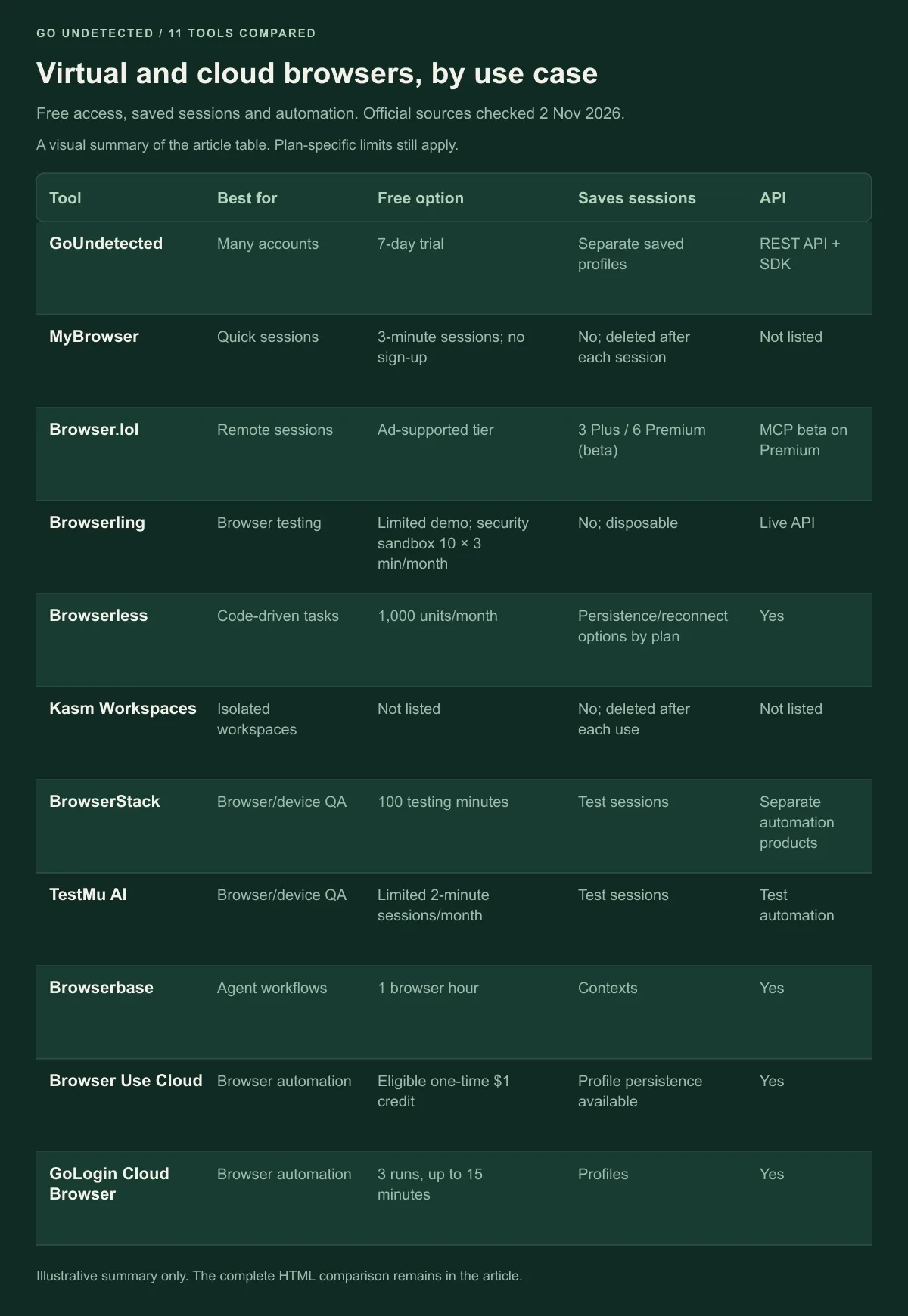
Visual summary of the complete comparison table. Free allowances, saved sessions and API access depend on each product and plan.
How to choose a virtual browser
Answer these six questions, and each one points to one of the groups above. First, try one representative task: open the site you need, confirm the relevant browser version, end the session and check what actually remains. This is a suggested evaluation workflow, not a test we performed on every service.
For an automated job, estimate three separate costs: runtime, network transfer and any model or premium-operation fees. For interactive work, also check latency from your location and whether downloads, clipboard transfer or a session timeout interrupt the task.
- Is it a one-off session, or will you return to the same logins? One-off: a free virtual browser. Same logins every day: saved profiles in an antidetect browser such as GoUndetected.
- Do you need a specific IP or country? Check the proxy options in the comparison table. For one stable IP per account, use a dedicated ISP proxy and check your proxy before you start.
- Do you need old browsers or iOS? Use a testing grid such as BrowserStack, TestMu AI or Browserling.
- Are you opening files or suspicious links? Use a disposable sandbox such as Browserling Cybersecurity or Kasm.
- Is the work automated or done by hand? Automated jobs and AI agents fit Browserbase, Browser Use Cloud, Browserless or GoLogin Cloud Browser. Manual work across many accounts fits an antidetect browser. To see what a site can read from a profile, try the browser fingerprint generator.
- How many people are on the team? Look for per-user pricing, shared access and folder permissions. If you are comparing antidetect tools for a team, see our list of the best antidetect browsers.
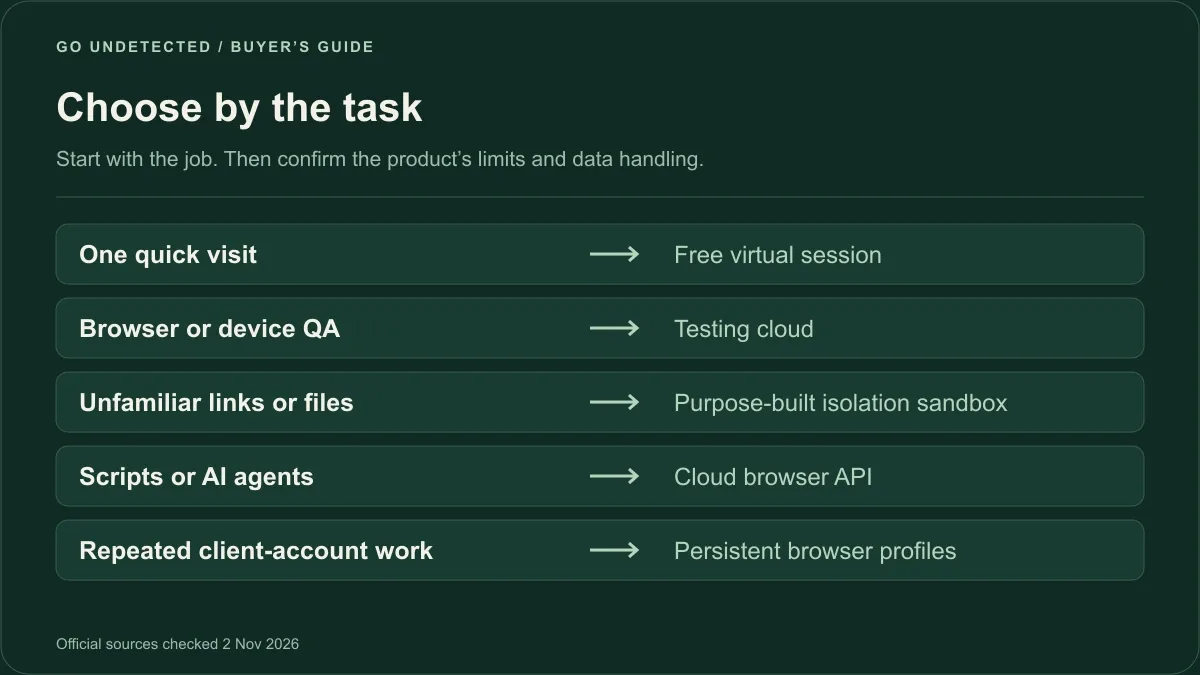
Choose the runtime by the task, then verify pricing, persistence and controls on the selected plan.
Frequently asked questions about virtual and cloud browsers
What is the best virtual browser?
There is no single best one. For free quick sessions, MyBrowser and Browser.lol work without installing anything. For testing, BrowserStack and TestMu AI cover more browsers and devices. For many accounts with saved logins and a dedicated IP per profile, GoUndetected fits better.
Is there a free virtual browser?
Yes. MyBrowser offers 3-minute sessions without signing up, Browser.lol has an ad-supported tier, and Browserling offers a limited free demo. Browserless has a developer-oriented free tier. Check session length and persistence for each service; “free” does not mean unlimited or permanently saved.
What is the difference between a virtual browser and a cloud browser?
They overlap. Both run the browser on a remote server and stream it to you. "Cloud browser" is also used for hosted browsers that scripts and AI agents control through an API, such as Browserbase or Browser Use Cloud.
Is a virtual browser the same as an antidetect browser?
No. A virtual browser isolates your device by running the browser elsewhere. An antidetect browser like GoUndetected gives each profile its own fingerprint settings, cookies and proxy, to help separate account environments. That is not a guarantee against account linking or verification. It often runs on your computer.
Are virtual browsers safe for opening suspicious links?
Disposable sandboxes such as Browserling Cybersecurity are designed for link investigation; file analysis requires the appropriate plan. Remote execution adds separation, not a guarantee of safety. Check data retention, file-transfer controls and logging before using any service for sensitive work.
Can I keep logins in a cloud browser?
Some providers allow it. Browser.lol paid plans include saved profiles in beta, and automation platforms offer persistent contexts. Saved-profile browsers such as GoUndetected retain browser state, while websites still control the validity of login sessions.
Does GoUndetected work as a cloud browser?
Yes, on supported plans. Its primary app is for Windows and macOS, while Team and Unlimited include cloud hours. The API and SDK documentation explains launching cloud sessions with browser-automation clients. Check the plan table for included hours.
Sources
Official pricing and documentation checked on 2 November 2026. Prices and allowances can change; use the linked plan page for your billing currency and term. Product suitability is our editorial assessment, not a performance or security guarantee.
- GoUndetected plans and proxy pricing: goundetected.io/pricing; free trial: goundetected.io/download
- MyBrowser: mybrowser.lol
- Browser.lol: browser.lol/en/upgrade
- Browserling Web Testing: browserling.com/web-testing/pricing; virtual browser demo: browserling.com/virtual-browser
- Browserling Cybersecurity: browserling.com/cybersecurity/pricing
- Browserless: browserless.io/pricing
- BrowserStack: browserstack.com/pricing
- TestMu AI: testmuai.com/pricing
- Kasm Workspaces Cloud Personal: kasm.com/cloud-personal
- Browserbase: browserbase.com/pricing
- Browser Use Cloud: browser-use.com/pricing
- GoLogin Cloud Browser: gologin.com/cloud-browser
Try GoUndetected
Need saved profiles for many accounts? GoUndetected Starter is $6/month for 5 profiles. Dedicated ISP proxies in the US and Ukraine are optional, from $2.20 per IP.